Hillsong – Stronger
There is Love
That came for us
Humbled to a sinner’s cross
You broke my shame and sinfulness
You rose again victorious
Faithfulness none can deny
Through the storm
And through the fire
There is truth that sets me free
Jesus Christ who lives in me
You are stronger
You are stronger
Sin is broken
You have saved me
It is written
Christ is risen
Jesus You are Lord of all
No beginning and no end
You’re my hope and my defense
You came to seek and save the lost
You paid it all upon the cross
So let Your Name be lifted higher
Be lifted higher
Be lifted higher
User Interface Elements
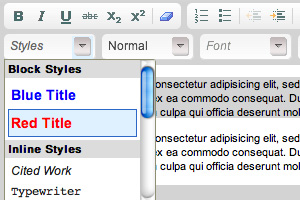
One of the most frustrating things to happen after a web project closes is that the client still does not know how to achieve nicely styled content. Clients are not required to know HTML let alone CSS, so how can they achieve nicely styled content?
I find many times web designers don’t design all possible User Interface elements and because of that, HTML/CSS coders don’t style them and developers don’t have these styling options in the Content Management System delivered. So if they are not even present in the system, how can anyone expect clients to be able to use the Content Management System to style content nicely in the first place.
So have the project been under-delivered? I don’t blame the web designers if its not within the brief. So dear project managers, pls know what the base UI elements are required and include that within the brief.
Have a look at:
- Baselinecss.com – Typograph, Forms
- YAML – Content, Forms
- Blueprint – Typography, Forms
- Mollio – Example
- Yahoo UI
So after looking at UI pattern galleries such as Pattern Tap, UI Patterns and others, I wanted to see if there is a complete list of possible UI elements that a web designer need to think about. I think there are just too many, see the consolidated list I’ve put together below.
Display of Content / Data
- Headings & Subheadings
- Paragraphs (with and without images)
- Highlighting Content
- Lists (ordered & unordered)
- Search Results
- Tabular data (with and without sorting)
- Modal Windows and Boxes
- Autocmoplete
- Content Listing Filters
Navigation
- Main Horizontal Navigation & Vertical dropdowns
- Sub Vertical Navigation & Horizontal dropdowns
- Accordion Menu
- Carousel
- Listing (text, text with visual, thumbnails)
- Search Results Listing
- Archive Listing
- Calendar
- Tags & Tag Clouds
- Sitemaps
- Pagination
- Footer
- Drop downs
- Breadcrumbs
- Tabs
- Links
- Utiltiy Links (text resize, print, email, etc)
- Icons
- Buttons
Getting Input
- Input Boxes
- Errors
- Form & Form Elements
- Input Prompt
- Password Strength Meter
- Feedback
- Captcha
- Calendar Picker
- Wizards & Steps
- Rate & Vote
- Inline Help Box and Highlights
Tasks
- Presenting Instructions
- Registration, Sign up
- Payment
- Confirmations
I know its not a very coherent list, but you get the idea. So dear web project managers, remember to include such UI elements into your brief and also remember to cost your client for these efforts.