I’ve been running web design, development and marketing projects for close to 20 years now and have seen my fair share of terrible situations where I ended up beating myself up for allowing it to happen. I’m hoping all project managers out there don’t screw up your own projects and hence putting down some of the Project Management Best Practices from my own experience in short point form style for the benefit of you Project Managers out there.
Projects
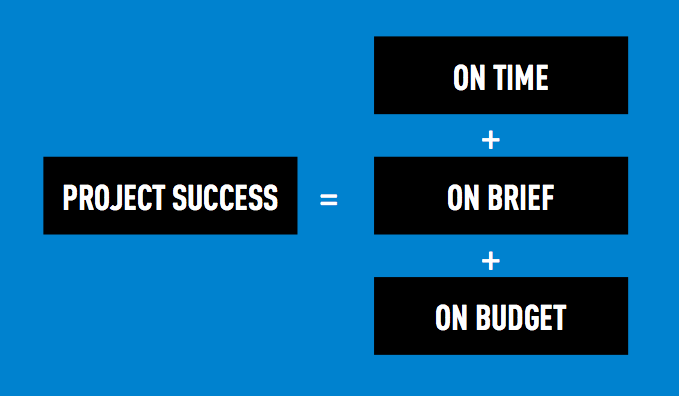
Projects are constrained under defined SCHEDULE, SCOPE and COST. Project Managers are then expected to deliver projects on TIME, on BRIEF and on BUDGET while ensuring highest QUALITY.
On Time, On Brief, On Budget
These are some simple yet at times easy to overlook hard skills a Project Manager needs to have.
On Time
1. Have a USEFUL Project Schedule
- Detail enough & clearly states who, what and when
- Realistic timings that are checked with the team that are actually doing the work
- Time costed for and turn around time for tasks are different
- Dependencies factored in (eg. Other project activities, Holidays, Leave plans etc.)
- Ensure relevant parties aware of involvement early (eg. Client’s IT team, other vendors, freelancers, etc.)
- Ensure stakeholders are present during review & sign off periods
- Plan time for revisions & buffer in time if needed
2. Milestones are your Best Friends
- Milestones have a date and time
- Major milestones should not be moved
- It protects the project from going out of schedule
- It allows good estimation on payment milestones
3. Define and Mitigate Risks Early
- Don’t wait till shit hits the fan
- Be paranoid
- Some risks can only be mitigated by clients
- Consult team members or domain experts for possible solutions
- Resolve issues as quickly as possible before it complicate other activities
- Be paranoid
4. Next Steps
- Clients must always be informed what is the next step and when it can be expected
- Do not allow clients to feel the project is floating or that your team is sleeping
- Ensure regular communication with client and team
- Always record agreements
- Always do contact reports even after a phone call or a conversation over beers
5. Push Projects for Closure
- Start non dependent tasks early
- Projects should not stall
- Project Managers are to push projects for closure so as to minimise opportunity costs
- The longer a project stretches, the more money the company loses
On Brief
1. Only within the Scope Of Work
- Scope of work must correlate back to activities and deliverables costed
- Review the assumptions together with client and ensure they understand
- Guard against Scope Creep
- New scope is not part of the plan, hence complicates and jeopardises the planned activities
- New items can go into next phase which can be costed for separately
- Don’t be a nice guy
- Project Managers are the bad guys, so let the Account Servicing / Business Development guys be the good guys
2. Common understanding on Deliverables
- Client and Team all needs to be clear and aligned on their expectations of the deliverables
- What is to be delivered?
- Who is producing it?
- In what format?
- What are the specifications?
- What are the mandatories?
- To be submitted to whom? and When?
- Where is it to be used
- Counter check against checklists
3. Check and test for Quality Assurance
- Have a Test Plan and Test it first yourself
- Check against scope, plans, documents, brand guidelines, specs, wireframes, keyscreens, browser compatibility, etc.
- For any build items, test that it works full circle
- For creative and interactive work, ensure creative team checks interaction quality as well
- Get fresh pairs of eyes to check
4. Know and Manage Client Expectations
- Know success factors up front (ie. KPIs / ROIs)
- Sometimes deliverables and client expectations don’t match up, so clarify
- Common sense is not common
- Don’t assume
- Avoid reworking
5. Keep an eye on the Project Objective
- Don’t detract from original plan too much
- Don’t win the battle and lose the war
- Always keep the project objectives in mind
- Don’t have tunnel vision
On Budget
1. Time is Money in the Service Industry
- Time spent is time spent (ie. Meetings, calls, look for images, helping your client tweak their slides, walk your client’s dog, etc.)
- Spend only time allocated for as detailed in the scope of work
- Any rework is time
- Stick to agreed round of revisions and pre-empt clients when the number of revisions are going to be exhausted
2. Nothing is Free
- Client will always ask for freebies
- Value and respect you and your team’s work
- Doing client a favour is doing your colleagues a disfavour
3. Up-sell when opportunities arise
- New requests can be addressed in a phase 2 with a new quotation
- Take note of other parallel complimentary projects in the client’s organisation
4. Time saved is money earned
- Work smart
- Use technology to automate tasks where possible (eg. Content Auditing, building a sitemap, data transformation, etc.)
5. Profitability depends on Project Management
- Your rates can be sky high, but if projects are badly managed, you will still lose money
Being a Project Manager
These are some in my view critical soft skills a Project Manager need to have.
1. Be the Heart of the Project
- Business Manager = First Impression, Project Manger = Sustained Impression, so how well this heart pumps will determine if there is going to be a next project
- Project Mangers responsible for Happy colleagues
- You are the central node between clients and team
- Motivate your team to victory
- Ensure client satisfaction
2. Be the First-line of Defence
- Know the scope and assumptions
- First to push back unreasonable requests
- Nobody likes a yes man
- Aim to be loved by both client and team
- Ask for help when needed
- Ask for help when needed
- Ask for help when needed
3. Effective communication
- Don’t have email diarrhoea (Digest for team)
- Listen, don’t just hear
- Be paranoid, document even calls
- Contact Reports is a must
- Nobody likes to read long emails, good to talk in person with a short summary email
- Efficient communication (10 sentences vs 1 sentence)
- Build Rapport
- Choose words carefully
- Don’t reply impulsively
- Be professional
- Set email sending delays (ps. this saved me many times)
- Understand & express urgency
4. Know the next steps
- Lead the team
- Always know what’s next & when
- When in doubt ask
- Bring in knowledge experts when required
- Escalate when needed
- Provide clients weekly updates (What was done this week, what is to be done next week, risks, mitigation recommendation, overall timeline review)
5. Know what you are managing
- Learn enough
- Keep up to date
- Don’t be shy to ask
- You can’t provide consultation if you don’t know it
6. Avoid common pitfalls
- Do ensure clear scope & guard against scope creep
- Do involve the right people on the project
- Do ask for help & learn from others
- Don’t be a yes man
- Don’t underestimate complexity
- Don’t suppress bad news
Hope these help. So go forth and be awesome and lead your team to victory.