Taiwan 09

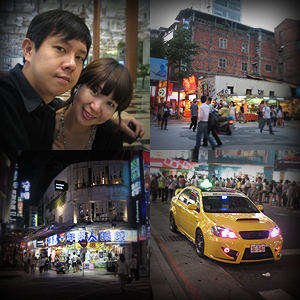
20090922_taiwan01Taiwan. The last time i’ve been to Taiwan was during my Army days and Taipei was once place i do have some memory and pictures of. I vaguely remembered walking along gray streets, friendly people and Taipei main station, other then that, i really can’t recall anything. That was some good 12 years ago.

This time, this Taiwan trip is with my dear wife and in someway its like a honeymoon of sorts. We left the kids back home with my Parents.
20090922_taiwan02

I planned the whole trip using Tripit. You can see our plans on Tripit which then allowed me to download the itinerary on my iPhone.

Reached airport super early. We were already checked-in and walking towards our gates at 6 plus in the morning. Got up to our Singapore Airline flight and checked what movie to see on Kris World. lol. I managed to catch Angels and Demons and half of Terminator Salvation as the plane landed, on the way back i saw the second half of Terminator Salvation and Death Note and half of Death Note 2.

20090922_taiwan03

When we landed, we had to figure out how to get to the city. At first i was wondering if there are trains from the Airport to the City, but apparently there isn’t and the normal way is to take a bus. We bought return tickets from airport to our hotel which is kinda cool and hassle free. The bus took roughly 1 hour and reached our hotel.
20090922_taiwan04

Our hotel is kinda amazing. Its used to be called “One Star Hotel”, but the fact is i think they are more like 3 star. lol… Now they have changed their name to “See You Hotel”, but their signage and even website address still reflects “One Star”. yah… kinda confusing and yet funny. We dropped off our stuff in the room and headed to Xi Men Ding which was not too far away.

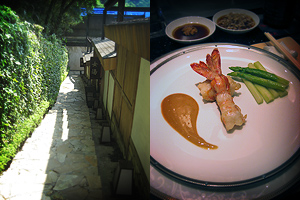
I loved observing another culture. The way people on the streets behaved, the school kids, the dressing, the hair styles, the mannerisms, etc… I was basically soaking up the Taiwanese culture. The whole “Huan Ying Guang Ling” (welcome in mandarin) was really like everywhere and they even have a certain tune to it.
20090922_taiwan05

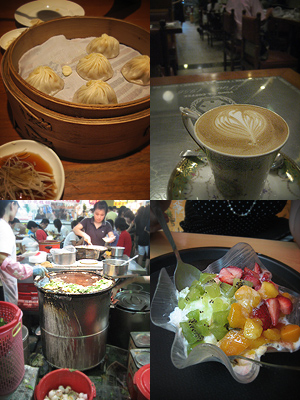
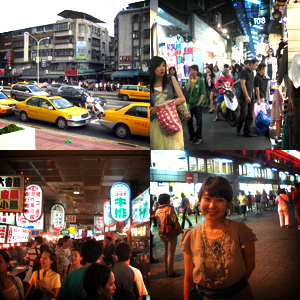
There were definitely some highlights on our trip. We had nice food, shopped alot, took all the public transport (ie. Bus, Taxi, Subway and Train) and shopped alot more. Strangely, but in some cool way, both of us did not like the night markets that much and felt they were kinda overated. Its just like a big pasar malams, i mean there is really nothing special.

Ok, i’m lazy to write out step by step, account by account of our whole trip, so i’ll just write out random highlights from the trip from here on.
20090922_taiwan06

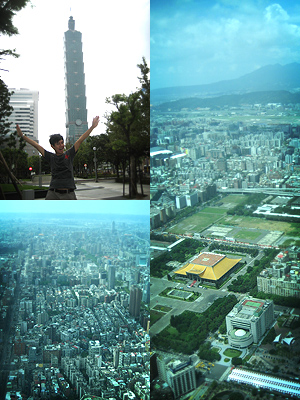
We went to Taipei 101 and it was really nice. The view from the top was amazing and we could literally see the whole of Taipei city.

We also went to Bei Tou for Hot Spring which was kinda nice, but somehow it was not as fantastic as we hoped.

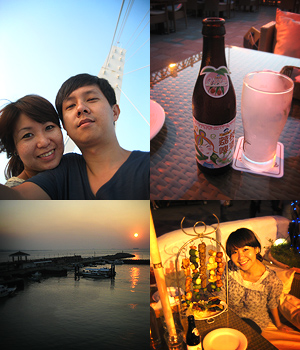
The best part of the trip for us was going up to Fisherman’s Wharf at Tam Shui. The sun set was gentle and romantic, we did silly stuff and took quite a number of photos while waiting for the sun to set. We then headed to a restaurant that was playing nice bossa nova music. We sat on the outdoor sofa chair and watched people walk by. Pearl ordered a large fruit drink, while I ordered a Taiwanese Lychee Beer which was delicious. We ate light stuff on skewers. It was just wonderful. The weather was also wonderful.
20090922_taiwan07

I’m just too lazy to blog about the while trip in detail, so hope the photos will be able to tell the rest of the story.
Google Calendar Project Management Orgy

For those working in digital agencies (and i reckon similar for many other industries) will know the pain about filling in time sheets, keeping track of multiple projects, working under tight timelines and the other pains revolving around keeping all the balls in the air while having the sanity to give the best you possibility can with a clear head.

One of the ideal way I initially envisioned was just to use a tool. An online collaborative project management tool such as Basecamp (as there is simply just too much hype around it), especially when the fairy tale story of how a web design company became a web2.0 product based company. So cool right? I mean everyone in the team should religiously open up the cool online collaborative tool and update it right? Its really not difficult right? But trust me, its still a pain to do paper work no matter how sexy the paper is.

So should such project management be centralised (ie. one person updates everything) or decentralised (ie. everyone does their part and update their own bit)?

Before we go into any further thinking, lets have a look at the following:

Google Calendar Orgy

I’m thinking using the Schedule resources via Google Calendar method might work. This is how i think it can work:

  • Each project has a calendar. So the calendar represents the projects & the events in that calendar lines up to become like a project schedule, you can even say its somewhat like a gantt chart, but in a calendar format.
  • Each resource (person) has a calendar. So this calendar represents the person’s daily schedule and the special thing about these calendars is that they auto-accept invitations.

So lets take a normal project for example. It has the following stages:

  1. Plan (wk 1 – 4)
  2. Design (wk 5 – 8)
  3. Build (wk 9 – 12)
  4. Launch (wk 13 – 14)

So we open the project calendar and create these “events” or “tasks” : Plan, Design, Build and Launch. Now each of these “tasks” will need resources to “action” on them, so we “invite” the necessary “resources”. As these “resources” auto accepts the invitation, they are then pegged as allocated resources for these project task.

So now the project manager / traffic person will set up all the project tasks and allocate all these tasks to the neccessary resources.

As Google Calendars can be shared and accessed via feeds, the following can be done.

  • Clients : subscribes to their own project calendar to understand the most updated project timeline and tasks scheduled for their project.
  • Resources : subscribes to his own resource calendar to understand the tasks scheduled ahead for him / her.
  • Project Manager : subscribes to all the projects he / she is managing.
  • Traffic : subscribes to all resources calendars to understand the resourcing plan weeks / months ahead and to assign tasks to resources.
  • Bosses : subscribes selectively to what they would like to know.

So if you are still with me, i believe its not hard to imagine how this sounds very workable in theory. I’m not sure though if it will work out in reality.

So here comes the orgy part. If I’m traffic and in charge of resource planning, then I have to subscribe to everything. Lets take for example if there are 10 projects and 20 resources in the company, i would have 30 calendars! OMG! Just having to view them stacked on top of one another is already… /faint…

So what do you think? workable or not?

Relationships

We meet all sorts of people in our journey of life. Relatives not by choice, friends from school when we were young, colleagues our bosses employed from work who are part of our team, random people online we get to associate with via our circle of friends, family that we settle down into.

When we spend long periods of time with people, bonds become stronger, trust grows, our emotional investments matters. These bonds slowly become part of our life these bonds slowly become part of who we are.

2009 is such a year of change. I changed company after 3 years of intense good work with great people, I changed the way I treat my God given wife after 11 years of marriage, I’m even in a phase of changing church after being there for 15 years.

It’s not easy. It’s not easy. Not easy all.

But looking foward, new bonds will be made, new experiences will be added to memory. The past will be cherished.

2009 will be a year to be remembered.

Project Management Tools

Project Management ToolMy job revolves around web design and development projects. And in my role its my job to manage resources and ensure the timely delivery of all projects for our clients according to the brief and within the allocated budget.

I have to say it is challenging to be able to know the status of every single project at any one time and to be able to plan resources elegantly so that everyone can have a life other then work + keep weekends drastically different from weekdays. I have to admit I depend alot on putting things down on paper or digitally on the web cuz i’ve got a terrible memory.

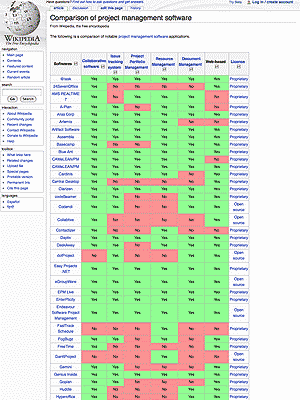
So of late, i’ve been dabbling with more tools out there and methodologically going thru the Comparison of project management software list on wikipedia.

I’ve used MS Project, a mix of solutions from MS Office, 37 Signal’s Basecamp, Google Docs, Wikis, etc… But i’ve yet to find one that is perfect for what i’m looking for which is a good marriage of project management and resource management.

If you’ve got experience to share and killer apps to recommend, do share and comment on this post. Thanks.